

Most processors record what they need. EPD Commerce lets you record what your business needs, on customers, payments, and subscriptions, without touching a spreadsheet or filing a support ticket.
Custom fields are part of EPD Commerce, the commerce and payment platform powered by Easy Pay Direct. If you process with Easy Pay Direct, this is part of what you get.
Table of Contents
What custom fields do and why it matters
Every business tracks something the platform was not built to track by default. A salesperson's name. A client account tier. An internal job reference. Right now, that data probably lives in a spreadsheet, a CRM note, or nowhere.
Custom fields inside EPD Commerce give you a structured place to put it, directly on the records that matter:
- Customers: tag a contact with their assigned rep, account type, or any field your team needs to segment by
- Payments: attach order context, attribution data, or internal reference codes to individual transactions
- Subscriptions: add internal notes, product variation flags, or billing-period identifiers that your team references on renewal
The data persists across the platform. It shows up in Easy Charge, hosted checkout, creation screens, edit screens, and detail views. You define it once. It follows the record.
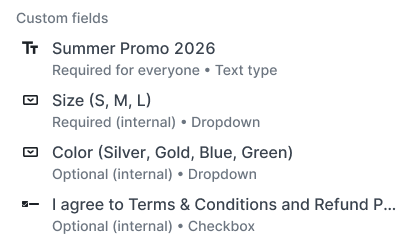
Setting up a custom field: no developer required
Merchants create, edit, disable, and delete custom fields without developer involvement. The field types available are:
- Text input
- Single select
- Multi select
- User record reference
When you name a field, the platform auto-generates a stable key from that name. You can edit the key before you save it. After the first save, the key is locked. That stability is what makes the field safe to reference in other systems, whether you are pulling data into a reporting tool, triggering an automation, or passing values through a webhook.
Field type and the record type it is attached to are also locked after creation. That is intentional: changing a field's type after your team has been writing data into it would break anything downstream that depends on it.
Where this earns its keep: reporting and automation
The real value is not the field itself. It is what you can do with the data once it is in a structured format.
Say your sales team has three reps closing subscription customers. If you create a "Sales rep" field on the customer record, every new subscription can carry that attribution forward. Pull it into your reporting tool. Cross-reference it against chargeback rates, LTV, or renewal behavior. That is analysis you cannot run if the data lives in a rep's notes column in a Google Sheet.
Custom field values flow through webhook events, including order.created, subscription.created, customer.created, and customer.updated. That means any automation platform listening to those webhooks receives the structured data you defined, in a predictable format, every time.
This is the difference between a processor that records the transaction and a platform that records the context around it.
How Easy Pay Direct merchants access this
EPD Commerce is not a separate product you buy. It is the platform Easy Pay Direct merchants operate on. Custom fields, along with every other EPD Commerce capability, are part of that relationship.
If you are already processing with Easy Pay Direct, access is part of your account. If you are not yet an Easy Pay Direct merchant, that is the entry point.
Frequently asked questions
What are custom fields in EPD Commerce?
Custom fields in EPD Commerce are merchant-defined data fields that attach to customer records, payments, or subscriptions. Merchants create them without developer help and use them to capture business-specific information that the platform does not track by default, such as sales attribution, internal reference codes, or account tiers.
How do Easy Pay Direct merchants get access to EPD Commerce custom fields?
Easy Pay Direct powers EPD Commerce. Merchants who process with Easy Pay Direct operate on the EPD Commerce platform and have access to custom fields as part of that relationship. There is no separate purchase or add-on required.
What field types does EPD Commerce support for custom fields?
EPD Commerce supports four field types: text input, single select, multi select, and user record reference. The field type is set at creation and cannot be changed afterward, which protects any integrations or automations that depend on the field's structure.
Can custom field data be used in integrations and automations?
Yes. Custom field values are included in webhook events for order.created, subscription.created, customer.created, and customer.updated. This means any platform or automation tool listening to those webhooks receives the structured custom field data alongside the standard transaction payload.
Where do custom fields appear inside EPD Commerce?
Custom fields appear in Easy Charge, hosted checkout, object creation screens, object edit screens, and record detail views. The data persists across the platform, so a field you define on a customer record is visible wherever that customer record appears.
Can a merchant change or delete a custom field after creating it?
Merchants can edit a field's display name, disable it, or delete it at any time. However, the field's key, type, and the record type it is attached to are all locked after the first save. This protects integrations that reference the field by its stable key.
If you are an Easy Pay Direct merchant, custom fields are already part of your account inside EPD Commerce. If you are not yet processing with Easy Pay Direct and want access to EPD Commerce, start at easypaydirect.com.