




How to Integrate ClickFunnels with Easy Pay Direct
A clean, five-minute integration to connect your Easy Pay Direct merchant account to ClickFunnels Classic or ClickFunnels 2.0.

About 7 minutes · No obligation · Get your gateway credentials
What is ClickFunnels, and why so many Easy Pay Direct clients use it
ClickFunnels is a sales funnel and landing page builder used by hundreds of thousands of online businesses to sell digital products, coaching, info products, supplements, services, memberships, and subscriptions. Instead of building a full ecommerce site, ClickFunnels lets a business string together landing pages, order forms, upsells, and recurring billing into a single conversion-optimized funnel. ClickFunnels comes in two product lines: ClickFunnels Classic (the original platform) and ClickFunnels 2.0 (the rebuilt platform). Easy Pay Direct integrates with both.
Many of Easy Pay Direct's clients run their entire payments stack through ClickFunnels — including a large share of the high-risk, subscription, info-product, coaching, supplements, courses, and dropshipping businesses that PayFacs like Stripe and Square restrict or shut down. Pairing a dedicated merchant account at Easy Pay Direct with a ClickFunnels funnel gives those operators a stable processing setup that won't get frozen mid-launch. The integration itself takes under five minutes once you have your gateway credentials. For info products, coaching, and other large digital goods merchants, this is the recommended path. Browse the full integration hub for other carts and CRMs we connect with.
Pick your ClickFunnels version
Jump straight to the walkthrough you need.
Integrate ClickFunnels Classic with Easy Pay Direct
ClickFunnels Classic connects to Easy Pay Direct through the NMI payment gateway framework. Inside your ClickFunnels account, add a new payment gateway, select NMI, and enter the Easy Pay Direct credentials your specialist gives you. Three steps total. The same Easy Pay Direct payment gateway powers the rest of your card and ACH processing.
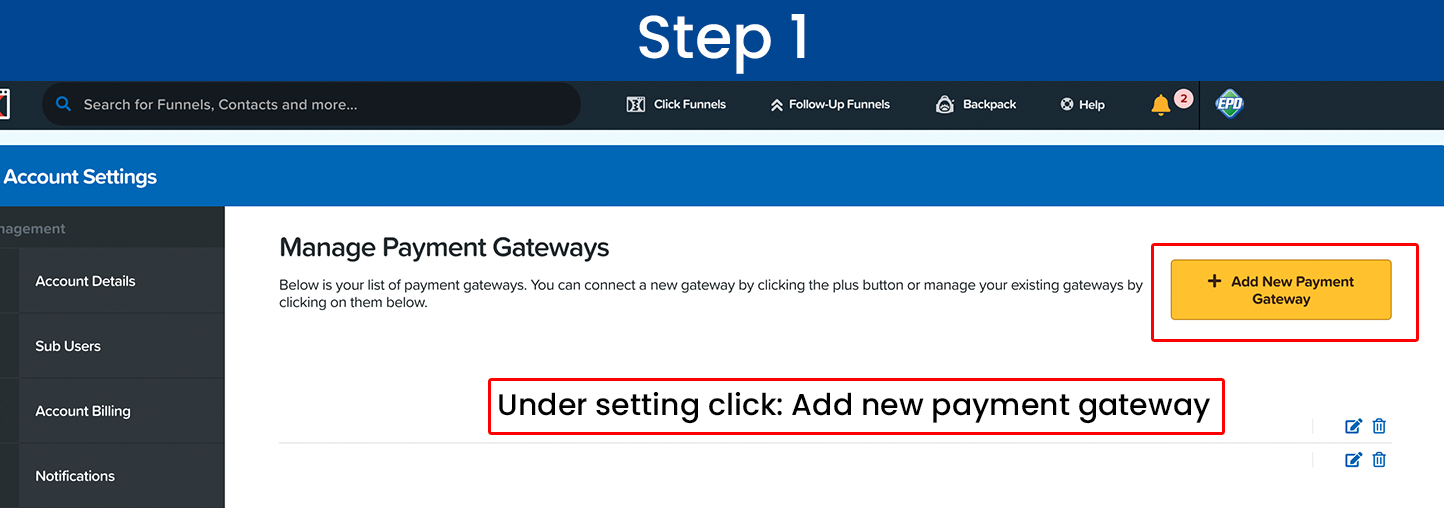
Classic Step 1 — Add new payment gateway
1. Log into ClickFunnels.
2. Open the Settings menu.
3. Click "Add new payment gateway."
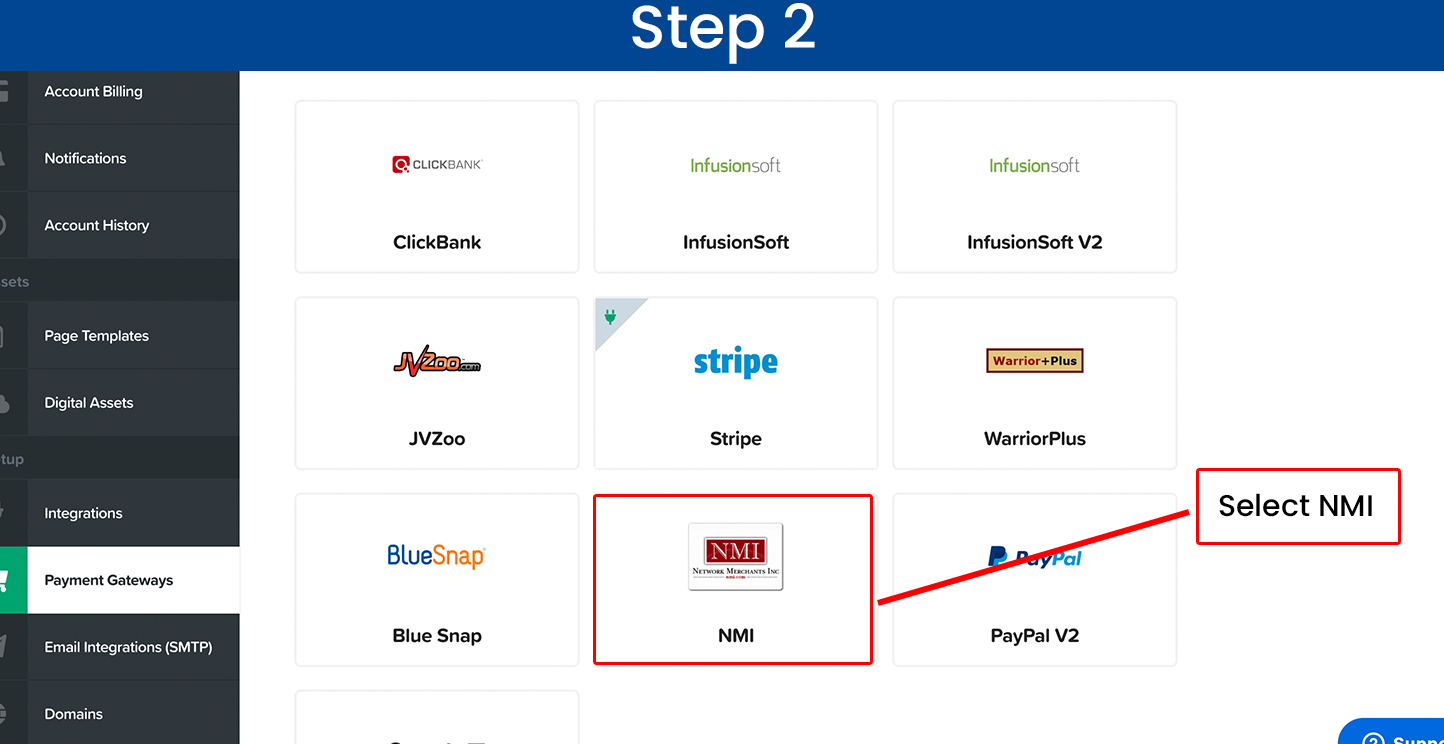
Classic Step 2 — Select NMI
1. From the list of available gateways, select NMI.
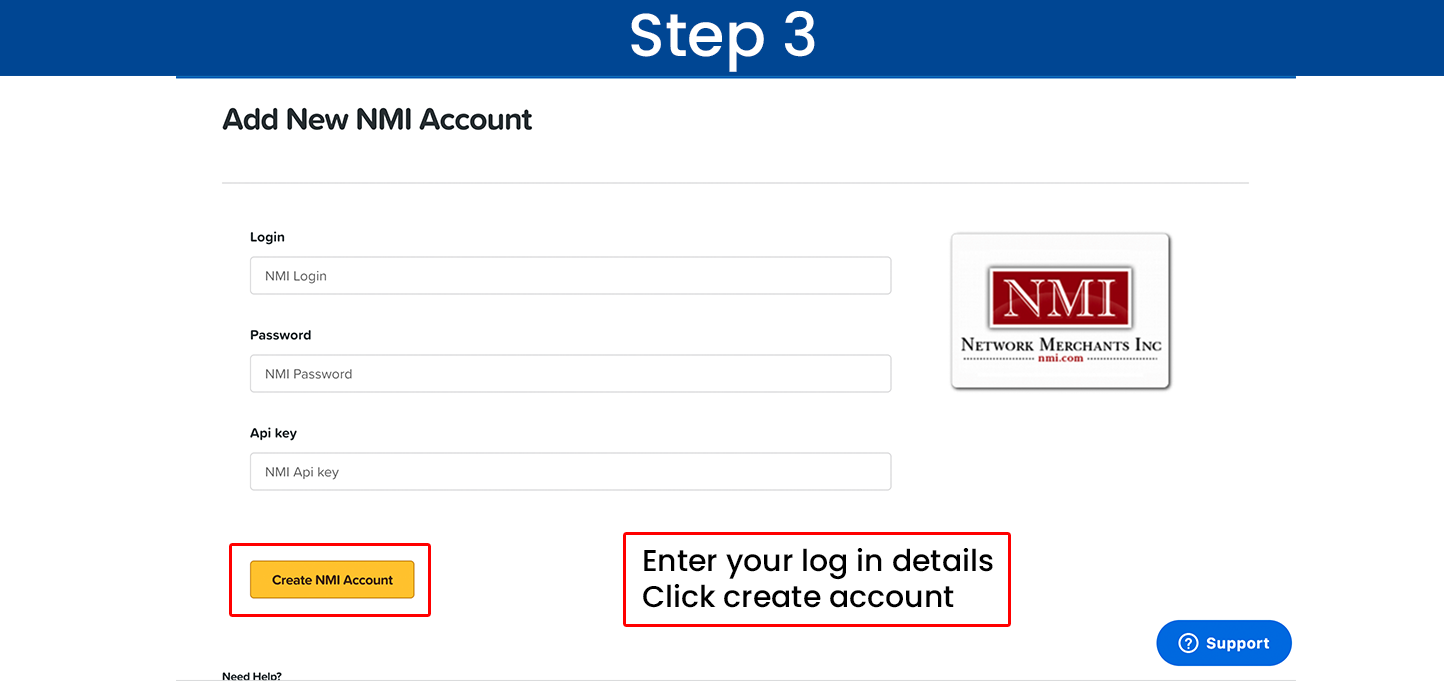
Classic Step 3 — Enter your Easy Pay Direct credentials
1. Enter the Username and Password Easy Pay Direct provided you.
2. Click Create Account.
You're live. Place a $1 test transaction through your funnel to confirm it routes to your Easy Pay Direct gateway.
Integrate ClickFunnels 2.0 with Easy Pay Direct
ClickFunnels 2.0 uses a refreshed gateway interface. The NMI framework is built in — connect it from the Gateways screen and enter the Easy Pay Direct credentials your specialist provides. Two clicks.
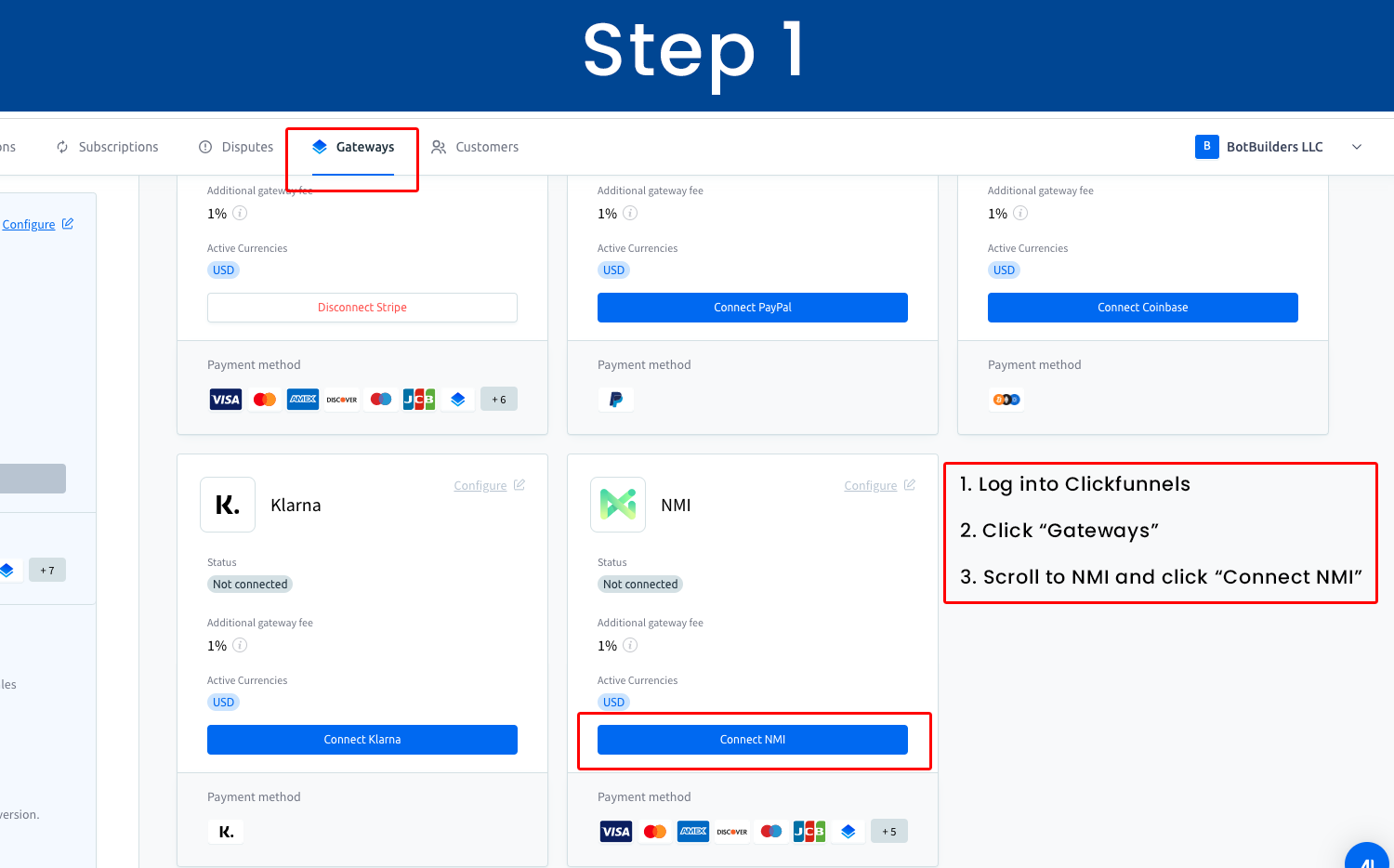
2.0 Step 1 — Open the Gateways screen and Connect NMI
1. Log into ClickFunnels 2.0.
2. Click "Gateways."
3. Scroll to NMI and click "Connect NMI."
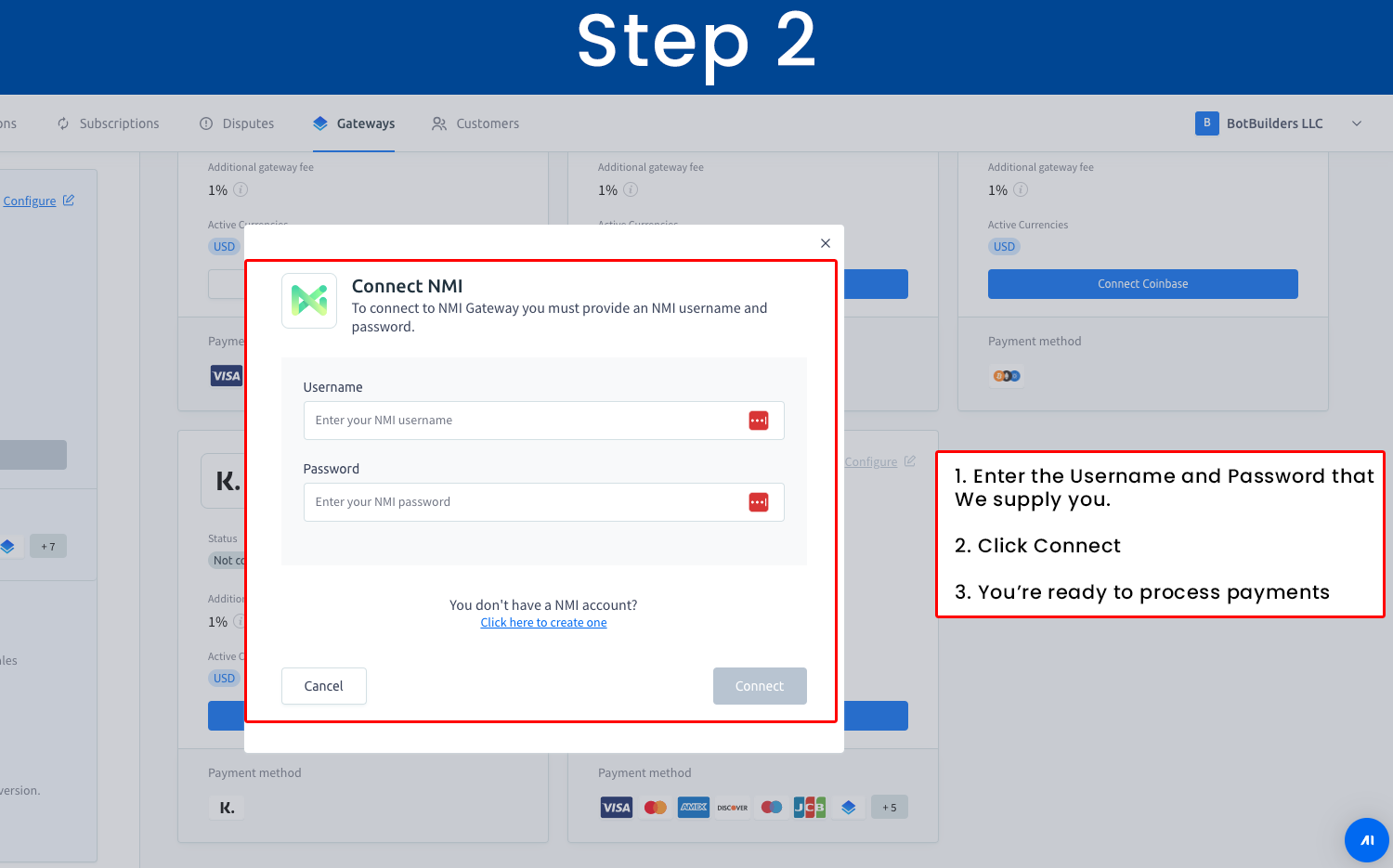
2.0 Step 2 — Enter your Easy Pay Direct credentials
1. Enter the Username and Password Easy Pay Direct provided you.
2. Click Connect.
You're live. Place a $1 test transaction through your funnel to confirm it routes to your Easy Pay Direct gateway.
Don't have your Easy Pay Direct gateway credentials yet?
Your gateway Username and Password are provided by Easy Pay Direct after your merchant account is approved. If you don't have them yet, apply now and a Certified Payment Specialist will follow up within one business day with your credentials and a quick integration call if you want one.
Frequently Asked Questions
How long does the ClickFunnels integration take?

Does Easy Pay Direct work with both ClickFunnels Classic and ClickFunnels 2.0?
What is NMI, and why is it part of the setup?
Why do ClickFunnels users switch from Stripe to Easy Pay Direct?
Does this integration support recurring billing and subscriptions?
What does Easy Pay Direct cost?
Can high-risk ClickFunnels users get approved at Easy Pay Direct?
What if my integration breaks or I get a decline error?

Get your Easy Pay Direct account and ClickFunnels integration
Tell us about your business and a specialist will follow up within one business day with your gateway credentials.
No obligation. A Certified Payment Specialist will follow up within one business day with your gateway credentials and (if you want one) a quick integration call.