





"Before Easy Pay Direct we had a $750k launch and $156k of that money was held. EPD has been super helpful in a bunch of different areas that none of our other processors provided. Highly recommend them."
HE
Hal Elrod
Founder, The Miracle Morning

Easy Pay Direct connects directly to HighLevel so you can accept payments inside your funnels, CRM workflows, and subaccounts — without the chargeback risk, frozen funds, or generic processor headaches HighLevel agencies typically face.
Already have your keys? Scroll down for setup instructions.
TRUSTED BY HIGHLEVEL AGENCIES AND OPERATORS
A selection of the 100,000+ businesses we support with dedicated merchant accounts.

30K+ Businesses
$12B+ Processed
13+ Years
500+ Integrations


Why HighLevel agencies and users choose Easy Pay Direct
Four reasons agencies and operators running on HighLevel pick Easy Pay Direct over Stripe, Authorize.net, and other generic processors.
Get StartedNo frozen funds on big launches
Other processors hold tens of thousands during high-volume launches. Easy Pay Direct specializes in funnel-driven and launch-style businesses, so your cash flow keeps moving when traffic spikes.

Approval rates built for funnels
Decline recovery and intelligent routing keep more transactions clearing, especially during launches, product drops, and seasonal traffic spikes inside HighLevel.

Chargeback protection out of the box
Pre-dispute alerts and CDRN stop chargebacks before they cost you money or trigger a TMF flag — protecting both your agency and your client subaccounts.

One real point of contact
Your agency and your clients get a dedicated Certified Payment Specialist — not a chatbot, not a phone tree, not a support queue.

Founders, agency owners, and creators who run their payments through Easy Pay Direct.
100,000+ Businesses
$12B+ Processed
13+ Years
"Before Easy Pay Direct we had a $750k launch and $156k of that money was held. EPD has been super helpful in a bunch of different areas that none of our other processors provided. Highly recommend them."
HE
Hal Elrod
Founder, The Miracle Morning
"EPD understands the challenges of businesses like ours, it's 100% worth working with them. They will tell you how to save and make more money plus prevent shutdowns so everything runs smoothly."
RF
Roland Frasier
Investor & Co-Founder, Scalable
Get your Easy Pay Direct merchant account approved and connected to HighLevel in about a week.
Already an Easy Pay Direct merchant? Follow these four steps to connect your account to HighLevel. Setup takes about 5 minutes. If you don't have your Easy Pay Direct keys yet, apply here.
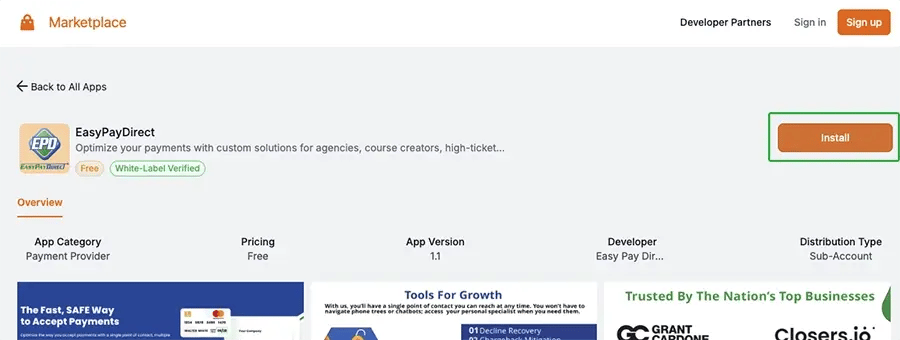
Open the HighLevel marketplace EasyPayDirect listing and click Install.
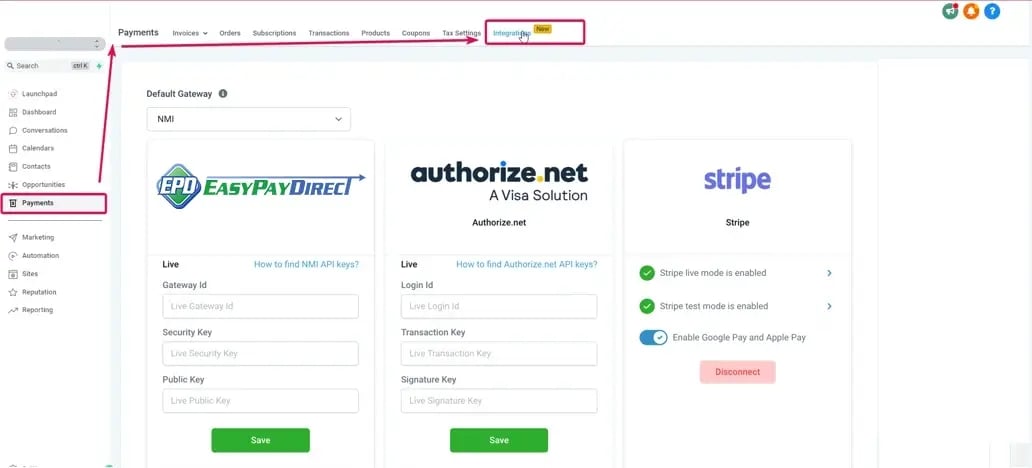
Inside your HighLevel subaccount, navigate to Payments → Integrations and select EasyPayDirect from the list of available payment providers.
You'll need three credentials from your Easy Pay Direct merchant account:
1. Gateway ID
2. Security Key
3. Public Key
Your Security Key and Public Key were sent to you by email when your Easy Pay Direct account was approved. If you can't find that email, contact your account specialist.
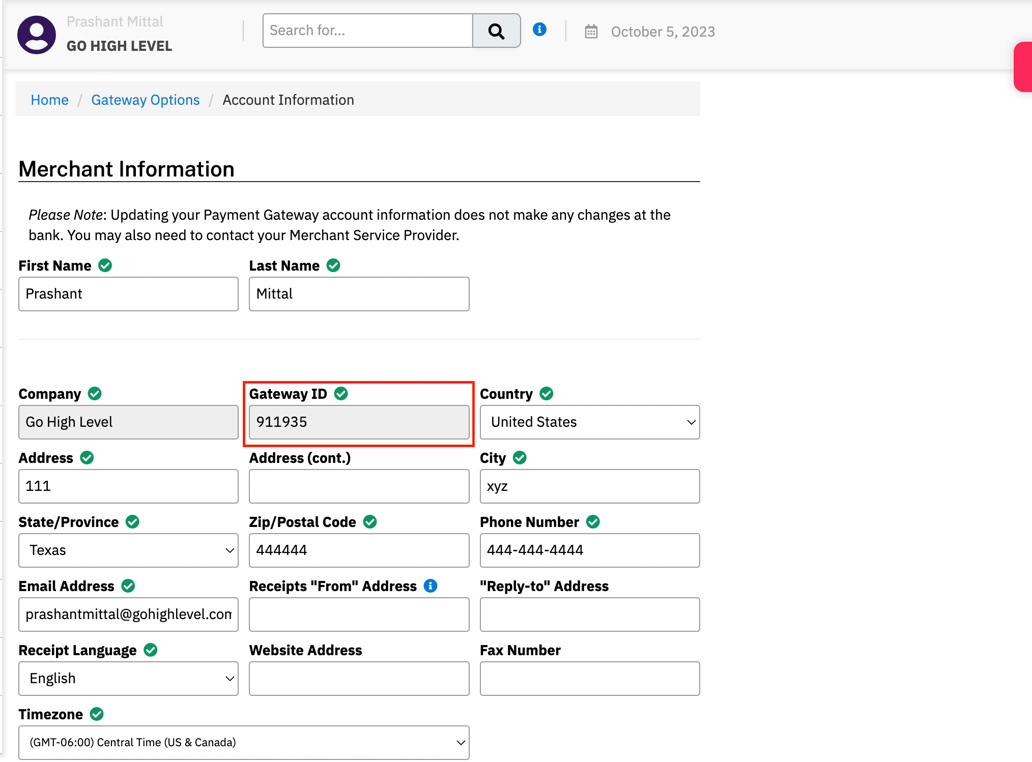
To find your Gateway ID, log in to your Easy Pay Direct merchant dashboard, then go to Settings → Account Information. Your Gateway ID appears in the Merchant Information section.
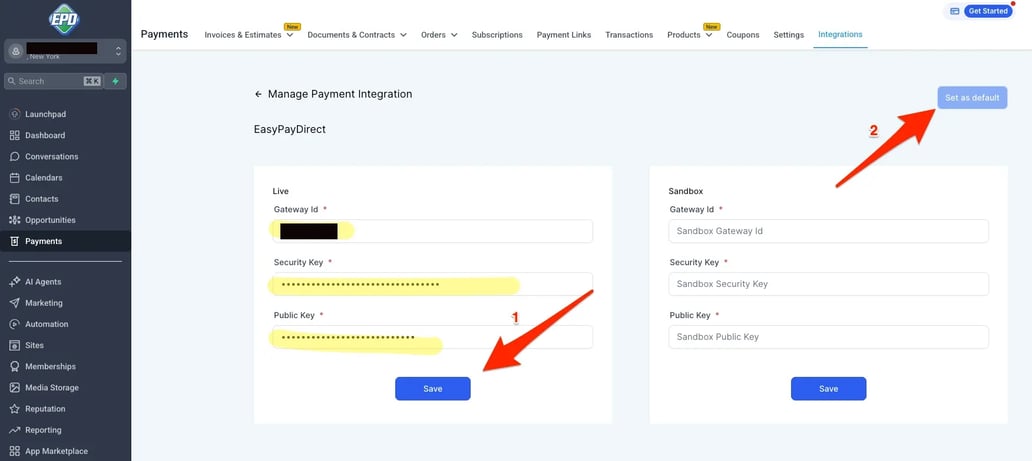
Back in HighLevel, paste each value into its matching field on the EasyPayDirect integration screen:
1. Gateway ID → Gateway Id field
2. Security Key → Security Key field
3. Public Key → Public Key field
Click Save, then click Set as default in the top right corner so HighLevel routes all new payments through Easy Pay Direct.
You're done. New funnels, invoices, subscriptions, and payment links in this subaccount will route to your Easy Pay Direct merchant account automatically. Need help? Talk to a Specialist — your dedicated EPD specialist can walk you through it on a screen-share.
Does Easy Pay Direct work with HighLevel funnels, payment links, and invoices?

Do I need a separate Easy Pay Direct account for each HighLevel subaccount?
What happens to my existing transactions when I switch from Stripe or Authorize.net to Easy Pay Direct in HighLevel?
Can Easy Pay Direct handle recurring billing and subscriptions inside HighLevel?
Why are HighLevel agency owners switching to Easy Pay Direct?
How long does the Easy Pay Direct + HighLevel integration take to set up?
Does Easy Pay Direct support white-label use for HighLevel agencies?
Join 100,000+ businesses that trust Easy Pay Direct for stable, high-approval payment processing.